University Policies and Procedures Manual (previously Business Policies and Procedures Manual)
Nonservice Pay Authorization
UPPM 30.30
For more information contact:
Payment Services
509-335-2060
Forms:
- Nonservice Pay Authorization (PDF)
- ASWSU Global Pay Authorization (PDF)
- ASWSU Pullman Pay Authorization (PDF)
- ASWSU Tri-Cities Pay Authorization (PDF)
- ASWSU Vancouver Pay Authorization (PDF)
- Student Media Pay Authorization (Excel)
Contents
1.0 Overview and Purpose
Nonservice Pay Authorization forms authorize disbursements to individuals who are not obligated to provide services to WSU in exchange for the payments.
- University officials may not require services in exchange for nonservice disbursements.
- Recipients may not have a related employment relationship with the University while receiving nonservice payments.
- Recipients may not teach credit courses or receive WSU benefits in exchange for nonservice pay.
- Individuals with service responsibilities to the University should be appointed as external committee members (ECMs) in Workday. ECMs are created for reimbursement of expenses only. Nonservice Pay Authorizations may not be used for expense reimbursement. See UPPM 30.28 for ECM reimbursement procedures.
- Nonservice Pay Authorizations may not be used to process student scholarships. See UPPM 30.90 for departmental scholarship procedures.
2.0 Applicability
2.1 Nonservice Pay Authorization
The Nonservice Pay Authorization form is used to authorize payments for fellowships, traineeships, and internships.
2.2 ASWSU/Student Media Authorization
The ASWSU and Student Media pay authorization forms (not the nonservice pay authorization forms) are used for payments made to ASWSU officers and Daily Evergreen reporters on all the WSU campuses.
3.0 Procedures
Note: Contact HRS to confirm that a pay authorization is the appropriate method to use before proceeding.
The University department prepares a Nonservice, ASWSU, or Student Media Pay Authorization form, as applicable, to establish the disbursement contract. The department retains the pay authorization form for documentation.
3.1 Routing
3.1.a Supplier Account
The department submits the Create Supplier Request task in Workday to establish a payee (e.g., supplier account).
A Create Supplier Invoice Request task initiates the workflow for each payment in Workday. (See Workday How Do I Create a Nonservice Payment for instructions.)
3.1.b Electronic Funds Transfer
Note: An Electronic Funds Transfer Authorization (United States Based EFT Only) form or an Electronic Funds Transfer Authorization (International Based EFT Only) form must be completed, as applicable, for electronic disbursement. See UPPM 30.28.
3.2 Taxability
3.2.a Nonservice Pay Authorization
In accordance with IRS regulations, the University does not complete or send recipients copies of 1099-Misc tax forms when using the Nonservice Pay Authorization.
For nonservice payments to non-U.S. citizens, the IRS requires the University to complete and send the 1042-S (Foreign Person’s U.S. Source Income Subject to Withholding) tax form to recipients. See Workday How Do I Create a Nonservice Payment for instructions.
3.2.b ASWSU/Student Media Pay Authorization
In accordance with IRS regulations, the University does complete and send recipients copies of 1099-Misc tax forms when using the ASWSU/Student Media Pay Authorization if claimants earn more than $2,000 in a calendar year.
3.3 Records Retention and Disposition
Completed pay authorization forms contain personally identifiable information (PII). Departments must ensure the protection of the records during the retention period and reduce the documents to an illegible condition at destruction. See UPPM 90.01 and 90.05 regarding University records retention and disposition requirements and management of confidential records.
3.4 Nonservice Pay Authorization Completion Instructions
The following instructions reference the Nonservice Pay Authorization form sample with numbered fields in Figure 1. Fields not described are considered self-explanatory. For questions about completing the ASWSU/Student Media payment authorizations, contact Payment Services or the office authorizing payment.
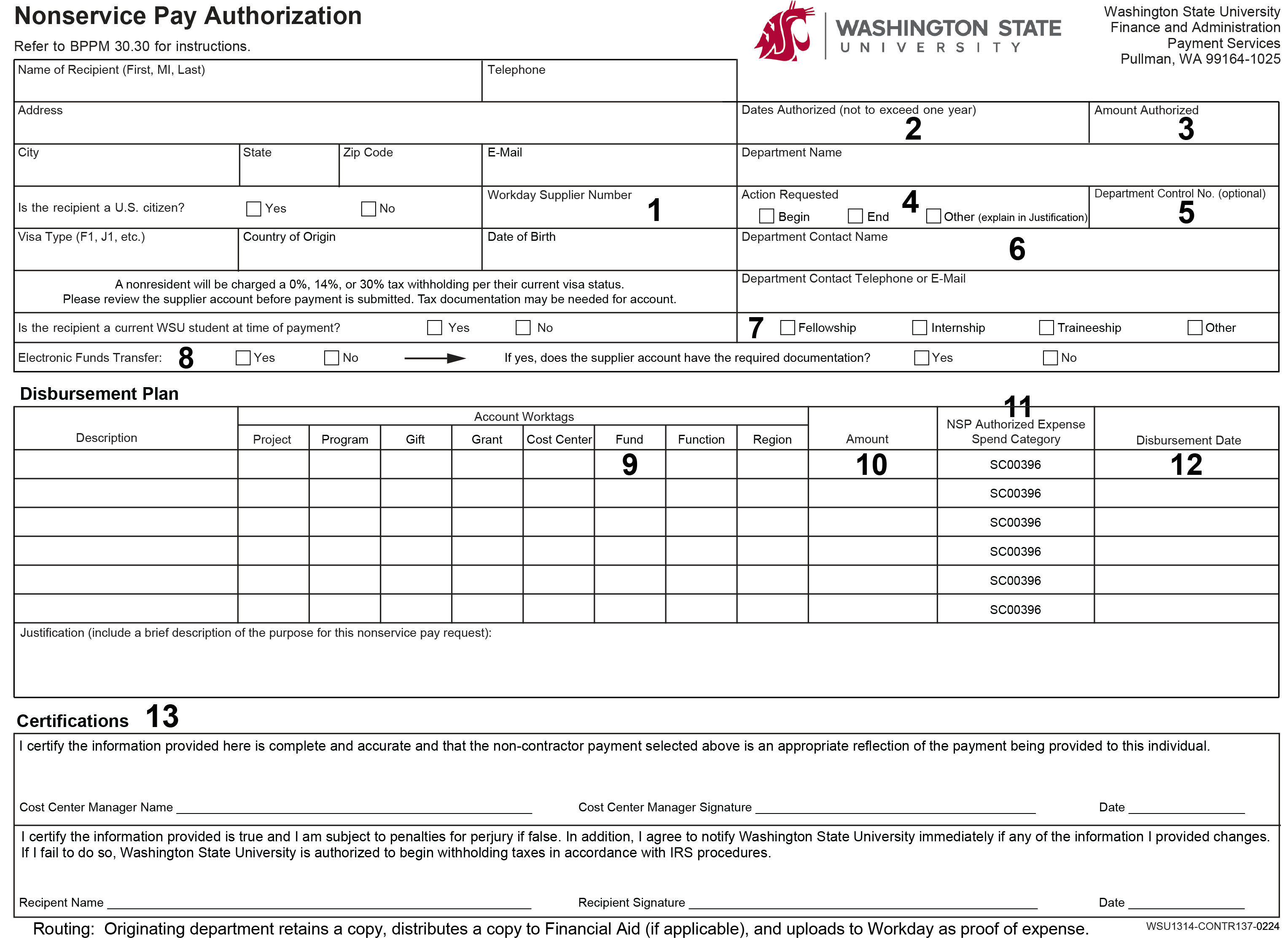
3.4.a Recipient and Department Information (1-8)
Workday Supplier Number (1). Include the payee’s Workday Supplier ID, if applicable. The payee’s WSU identification number is optional.
Dates Authorized (2). Specify the begin and end dates of this authorization. Prepare a separate form for each year if the fellowship, internship, or traineeship is for more than one year.
Amount Authorized (3). Indicate the total amount authorized for the specified period.
Action Requested (4). Check the applicable action. Note: Each payment action requires a separate Nonservice Pay Authorization form.
Department Control Number (5). The department may enter a sequential departmental control number, which is a reference number for the documented transaction. The department must enter the date the form is prepared.
Department Name (6). Specify the department administratively responsible for the program.
Purpose of Payment (7). Check the appropriate boxes to indicate:
- If the payment is for a fellowship, internship, traineeship, or other; and
- Whether or not the supplier account has the required documentation.
Electronic Funds Transfer (8). Indicate whether or not the payment is to be provided by electronic disbursement. (See UPPM 30.28 and Workday Payment Elections for instructions.)
3.4.b Disbursement Plan (9-12)
Prepare a disbursement plan for the period. Include the account worktags, the amounts to be disbursed, and the disbursement dates.
Allowable Funds (9). Select the applicable fund worktag from the dropdown menu under Fund. Note: Nonservice pay disbursements are allowed with the following fund types only:
- FD043 Grants and Contracts – Federal
- FD044 Grants and Contracts – State
- FD045 Federal Work Study Program
- FD046 State Work Study Program
- FD047 Federal Student Financial Aid
- FD048 Federal Direct Loans
- FD049 Donated Funds
- FD050 WSU Foundation
- FD051 Alumni Association Donated
- FD054 Student Book Corporation
- FD085 Grants and Contracts – Local
- FD089 Athletics Contributions
- FD095 Scholarships and Fellowships, non-donated
- FD180 Registered Student Organizations
Amount (10). See Workday Create Expense Report for instructions.
Authorized Expense Spend Category (11). Nonservice pay expenses are to be recorded under spend category SC00396 only.
Disbursement Date (12). The disbursement date is the first working day of the month.
3.4.c Certifications (13)
The recipient and the applicable Cost Center Manager must both certify the Nonservice Pay Authorization.
3.5 Disbursement
In Workday submit the Nonservice Pay Authorization using the Create Supplier Invoice Request task by the 25th of the month for disbursement on or before the middle of the following month. Note: The payee must be established as a Workday supplier prior to disbursement.
The University department prepares and submits a Create Request for Supplier Change and a Create Supplier Invoice Request task to set or change the disbursement. (See Workday Create Supplier Invoice Request for instructions).
3.5.a Series of Payments
A single payment installment is established by using a Create Supplier Invoice Request each month. The University department is responsible for recovery of incorrect payments.
4.0 Related Resources
UPPM 30.28 Funds Transfer of Expense Reimbursement
IRS Instructions for Forms 1099-MISC and 1099-NEC
_______________________
Revisions: Feb. 2026 (Rev. 653); Oct. 2024 (Rev. 634); Nov. 2021 (Rev. 580); Jan. 2021 (Rev. 560); Sept. 2018 (Rev. 519); Dec. 2007 (Rev. 311); Feb. 1998 (Rev. 114); Aug. 1994 (Rev. 95); June 1991 – moved from UPPM 40.75 (Rev. 86); Jan. 1989 – new policy (Rev. 74).